Information Radiators for Supporting Conferences
Abstract
Information Radiators (IRs) provide context-specific information in a semi-public place where a group of people can see it while working or passing by. They can simplify information sharing “out-of-the-box”, foster awareness and socialization, create serendipity and enhance collaboration. One interesting application area for information radiators is to support community meetings like conferences. We have been exploring this field since 2004 and have created several prototypes along the way – CommunityMirrors (CM). In this demonstration we show the most recent version of CM with the data from ECSCW 2026. In addition to an interactive large screen interface we present ways for evaluating the use of the interface 24/7 and a first prototype of a smart glasses interface to the same data.
Keywords: information radiator, CommunityMirror, community support, conference support, interactive screen, smart glasses, head-up display, CommunityGlasses
License
Michael Koch, Julian Fietkau, Christian Liepe, Valentin Lüdenbach. 2026. Information Radiators for Supporting Conferences. In: Proceedings of the 24th EUSSET Conference on Computer-Supported Cooperative Work (ECSCW) – Posters and Demos, Reports of the European Society for Socially Embedded Technologies. ISSN: 2510-2591 https://doi.org/10.48340/ecscw2026_127

This article is released to the public under the Creative Commons Attribution 4.0 license. You are free to share and adapt this work as long as the attribution to the authors is preserved. For details, see: https://creativecommons.org/licenses/by/4.0/
Find the latest version of this document in the EUSSET Digital Library: https://dl.eusset.eu/
1 Introduction
Community support is a central topic in CSCW. Summarizing different definitions, one can characterize communities as groups of people who share values or interests and who collaborate or help each other in the context of the common interests (Mynatt et al., 1997). Communities often gather at physical meetings like conferences or workshops (for scientific communities), where people have the opportunity to make new discoveries and generate new commitments.
Information radiators (IRs) are a possibility to support communities in physical places. They provide context-specific pieces of information in a semi-public place where a group of people can see it while working or passing by. They can simplify information sharing “out-of-the-box”, foster awareness and socialization, create serendipity and enhance collaboration (Koch, 2025).
We have explored the field of supporting physical community meetings with large information radiators based on interactive screens since 2004 and have created several prototypes on the way (CommunityMirrors, Koch, 2025). In this demonstration at ECSCW 2026 we show the most recent version of the CommunityMirror with the data from the current conference. In addition to an interactive large screen interface we present a first prototype of a smart glasses interface to the same data.
In the context of the larger CommunityMirror project we pursue the following goals with the ECSCW 2026 demo:
- Check how much effort it takes to collect the data
- Learn what data is beneficial for community members in this scenario
In this paper we report about the effort needed and about lessons learned regarding what data is beneficial. More input to the lessons learned is expected to arise from discussions during the demo session at ECSCW 2026.
2 Related Work
In the history of HCI one can find some applications intended to support conferences or workshops. There are both desktop-based applications and the use of new devices – namely (RFID) badges and screens or mobile applications (Armenatzoglou and Marketakis, 2009; Atzmüller et al., 2011; Borovoy et al., 1998; Cox et al., 2003; Dey et al., 1999; McCarthy et al., 2004a,b; Sumi and Mase, 2002; Windhager et al., 2014; Zenk et al., 2014). Most contributions offer interesting new design solutions, but have only been used in one or two isolated events without broad evaluation. We have contributed to the related work with the Meeting Mirror concept and application (Koch, 2004; Koch et al., 2004) which has been prototyped and evaluated in the CommunityMirror project several times over a period of twenty years (Koch, 2025).
More usages (and evaluations) of large screens for supporting offline communities can be found in the knowledge management domain. Examples are the Plasma Poster from Fuji Xerox Palo Alto Laboratory (Churchill et al., 2003), the Magic Wall from Accenture Research, and the CommunityWall (or Cwall) from Xerox Research Lab Europe (Agostini et al., 2000; Snowdon and Grasso, 2002). The CommunityWall has been designed to support serendipitous information discovery and create an environment that fosters social encounters (conversation) using documents, news and people’s opinions on them as a trigger. While in the Campiello project, where the CommunityWall was invented, the focus was on open communities, later the focus of the development switched to office environments, i.e. communities sharing the same physical work location (as in Plasma Poster and Magic Wall).
3 Data Model and Data Collection
The concept of information radiators is to (interactively) present information that can be useful for the target audience – in this case to the conference participants. Researching what information might be beneficial for community members, we came to three different types of information (Koch, 2004, 2025; Koch et al., 2004): Information about people (in the community), information about organizations or groups, and additional information (content).
Based on this basic idea we derived the following information (objects) as being of use for the audience:
- conference participants (name, affiliation, portrait image, CV, link to web page)
- organizations of conference participants (name, country, description, photo)
- agenda items during conference, e.g. presentations (title, presenters/authors, start and end times, …)
- publications at the conference (title, abstract, authors, full text, …)
- publications at former (ECSCW) conferences (from the EUSSET Digital Library)
- news/announcements (from the conference organizers)
- news/announcements from EUSSET (hub.eusset.eu)
- general IT news
This selection is based on discussions on what might be beneficial for meeting participants and on empirical evidence from earlier deployments (see Koch, 2025).
In addition to the “serious” information, we added some non-serious content for making the display attractive to approach: photos (from the current conference and from earlier instances), funny images and texts. All these information items consist of a catchy title, an image (wherever possible), and a short abstract with links to further information online. Additionally, all the information items are linked to other information items to create an information graph for browsing.
4 CommunityMirror
The main display device is a large interactive touch screen – at ECSCW 2026 we are using a CTOUCH Riva R2 65" display.
The core element of the user interface is an “information flow” that shows the selected data items as circles, in various sizes, showing the title and the image (see Figure 1). Depending on the data type the circles have a specific color: persons are light blue, organizations are dark blue and content items are green. These flow items move across the screen, from left to right or right to left, until they leave the screen which results in another item being selected and inserted in the flow.
Following a light gamification approach, the users can interact with the flow items – e.g. stop them, drag them around, even throw them outside the bounds of the screen to make them disappear.
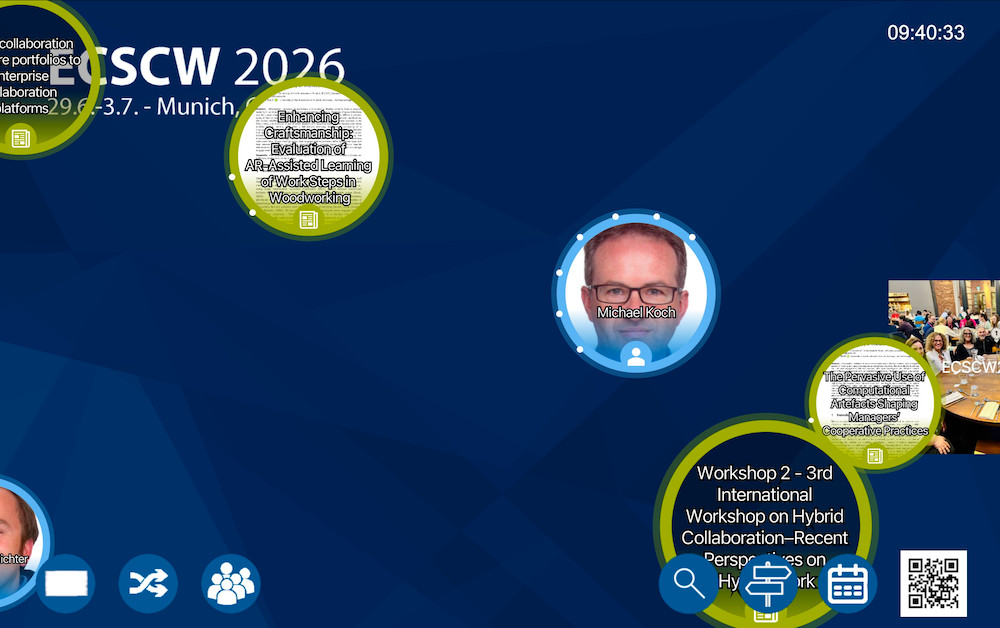
When a flow item is touched, the animation of the selected item stops, and a detailed view of the item is displayed showing the abstract (in a scrollable window). After some time without interaction, the item cycles back to the non-detailed view and disappears. The detail view not only shows the selected item but also other items that are related to the selected item as a graph (see Figure 2). This graph can be used to navigate to other information.
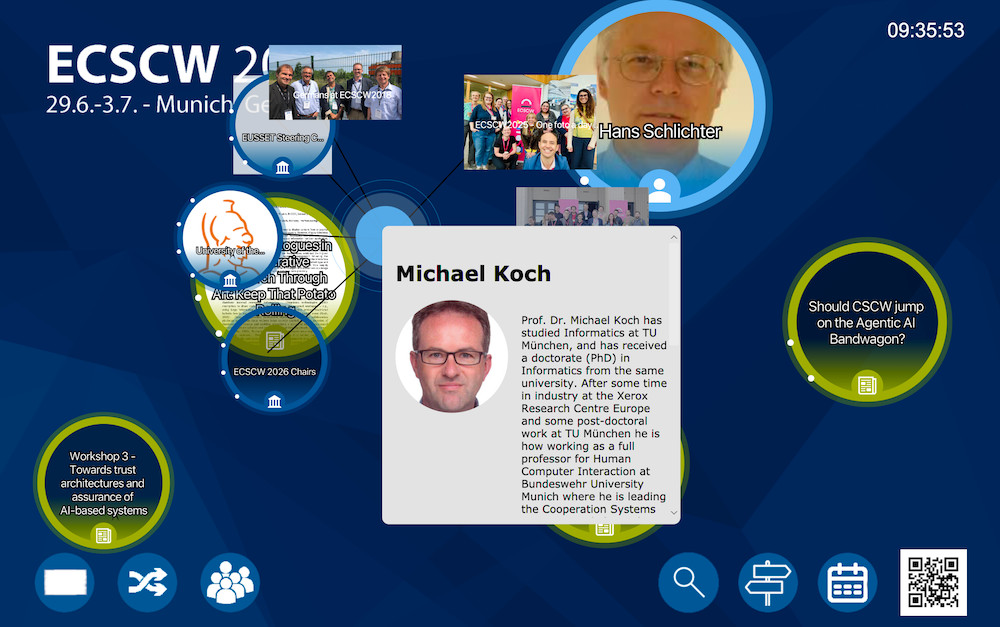
Additionally, a QR code is displayed in the detail view that can be used to capture the information on a mobile device for later access.
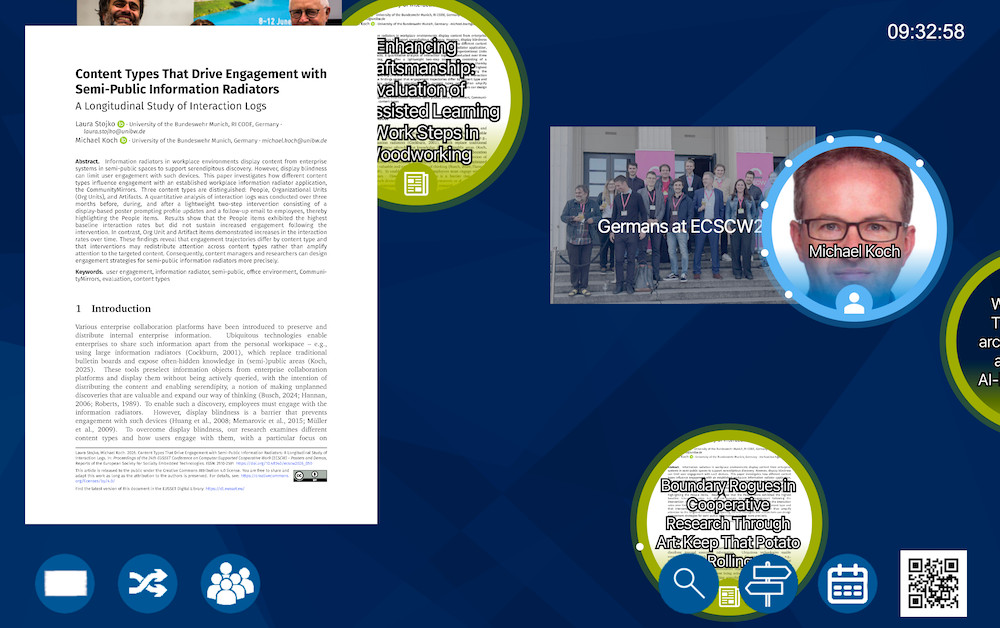
In addition to the flow we added “teasers” (see Figure 3), a poster-like display of one item (quarter to half a screen size) that is shown from time to time. Touching the teaser results in opening the item in graph mode for browsing.
Finally, we added some more static information that is of special interest for the users:
- a clock in the upper right corner
- a button to show a map of the conference location
- a button to access the conference program of the current day
- a button to access information about the installation
- a button to replace the currently shown flow items (refresh information flow)
- a button to replace the currently shown teaser
- a button to show all the EUSSET steering committee members present as conference participants – a kind of pre-configured search
Since we are interested in how often and in which way people interact with the CommunityMirror to explore the displayed information, we added functionality to capture interaction and observation data (about active and passive usage) for scientific evaluation. If you are interested in more information on this, join us at ECSCW during the demo session or see Koch (2025); Koch et al. (2023); Rohde et al. (2023).
Compared to earlier deployments at community meetings, the specific improvements for this version of the CommunityMirror are the possibility to access the data on mobile devices (linked with the QR code) and the functionality to track activity in front of the large screen.
For checking how much effort it will take to collect the data, we also documented the activities needed with the current framework (which is mainly the CommunityMashup (Lachenmaier et al., 2011) to collect and link data from several sources – including simple spreadsheets):
- First we collected photos of former ECSCW events and linked them with the persons present on the photos – This entailed inserting one row in a data collection spreadsheet that is automatically imported.
- Then we inserted the conference program, again with links to papers and persons – Again one row in the data collection spreadsheet copied from the data for accepted papers from EasyChair.
- For the images for program items we exported the final paper PDFs from EasyChair and automatically converted the first pages to PNG images.
- The participant information was also easy to collect – We were able export the data from the registration application and copy it to the data collection spreadsheet.
- In addition to the organization links from the participant information, we spent a little time to add additional organizations such as “EUSSET Steering Committee” and link the participants to these in the spreadsheet.
- The most work was spent on searching portrait images and short text descriptions for the participants – We had to check the websites of the participants for images, download them and link them to the participants in the data collection spreadsheet. In addition to the websites we looked ad LinkedIn where most of the participants had an English info text. This took quite some time – we recommend to ask this information from the participants when registering for the conference.
- Adding announcements and news was again easy – we looked for adequate RSS sources and added them in the CommunityMashup.
Together, this process took half a day, and the data stored in CommunityMashup was immediately usable for the CommunityGlasses application described in the following.
5 Smart Glasses
When showing an information radiator like the one presented in the previous section, we often heard the question whether this can be better handled using smart glasses. We tried to address this argument and ideas for future solutions in Koch et al. (2024).
At ECSCW 2026 we present a first prototype that demonstrates this idea. The prototype is implemented as a head-up-display-like system using the XREAL Air 2 Ultra smart glasses (Figure 4).
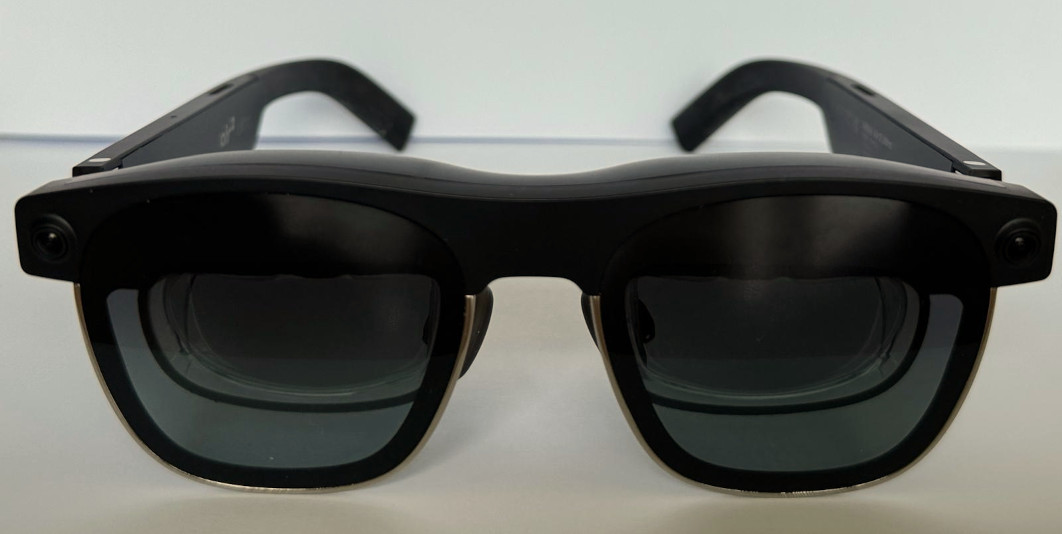
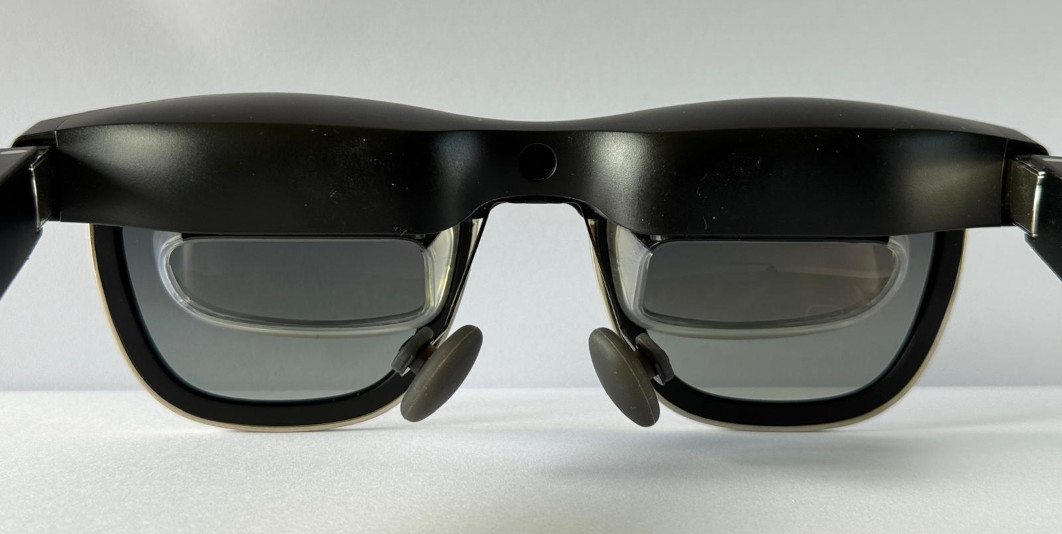
Figure 5 shows the overall architecture of the smart-glasses prototype, including its main data sources and interaction components. It illustrates how contextual information from different sources is integrated and processed within the system and then delivered to the smart-glasses interface through different display modes.
Based on typical activities within a conference environment we derived several types of information that may provide value to participants. These include contextual information about nearby participants (e.g., name, affiliation, or associated publications), reminders about upcoming conference sessions, and short hints about relevant talks or events taking place during the day. The underlying data model is similar to the one presented in Section 3 for the CommunityMirror.
Compared to large public information radiators, the design requirements for a wearable information radiator are different. In the CommunityMirror scenario it was important to present content that actively motivates users to look at the display. In contrast, smart glasses are continuously visible to the wearer and therefore require careful control of the amount and timing of displayed information. A key design goal is to ensure that the interface provides relevant information while minimizing distraction and cognitive load (see Figure 6).
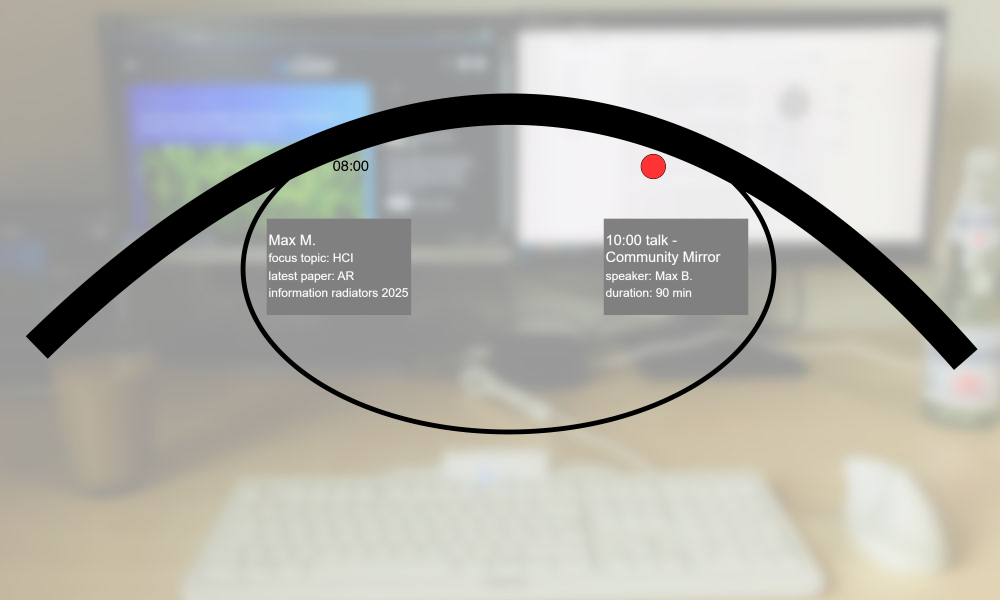
To achieve this, the system relies on context-aware information selection. Information elements are shown depending on contextual factors such as time, location within the conference venue, and the current activity of the user. For example, when approaching a scheduled presentation the system may display navigation information or reminders about the upcoming talk. During a talk, information about the presenters or other work by the presenters can be shown. On the other hand during social interaction in breaks the glasses may provide lightweight background information about the person currently in the user’s field of view to support networking and serendipitous discovery of shared interests (see Figure 7).
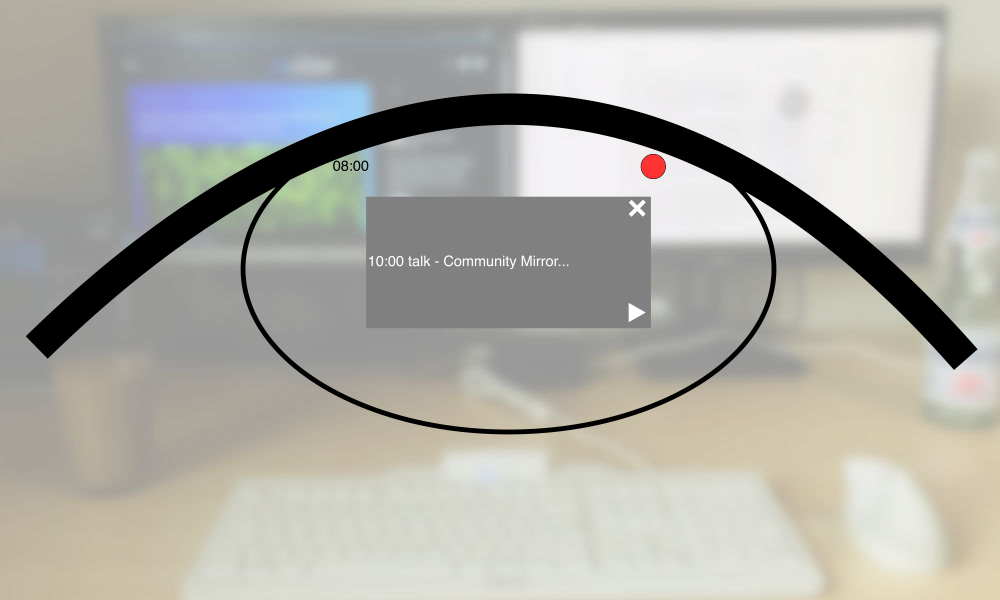
Another important requirement is the reduction of disturbance during focused activities. If the wearer is concentrating on a presentation or is engaged in a conversation, the system should avoid intrusive notifications. For this reason the prototype supports a minimal head-up display layout and includes a “do not disturb” mode that limits the visible information to essential status elements such as time or critical reminders. More details can be accessed through explicit user interaction with hand guestures.
6 Summary and Outlook
In this short paper we have reported on results from the long-term project “CommunityMirrors” – an effort for exploring the design space of large interactive screens in semi-public environments acting as interactive information radiators. We have particularly focused on using the CommunityMirror information radiators in conference scenarios.
During ECSCW 2026 we presented an interactive large-screen-based CommunityMirror showing information about the conference – both about the participants and about the program. Additionally, we presented a smart-glasses-based solution to present the same information as on the screen (a “HUD for conferences”) drawing on the same information sources. We found that it does not take a lot of effort to collect and annotate the data needed for this.
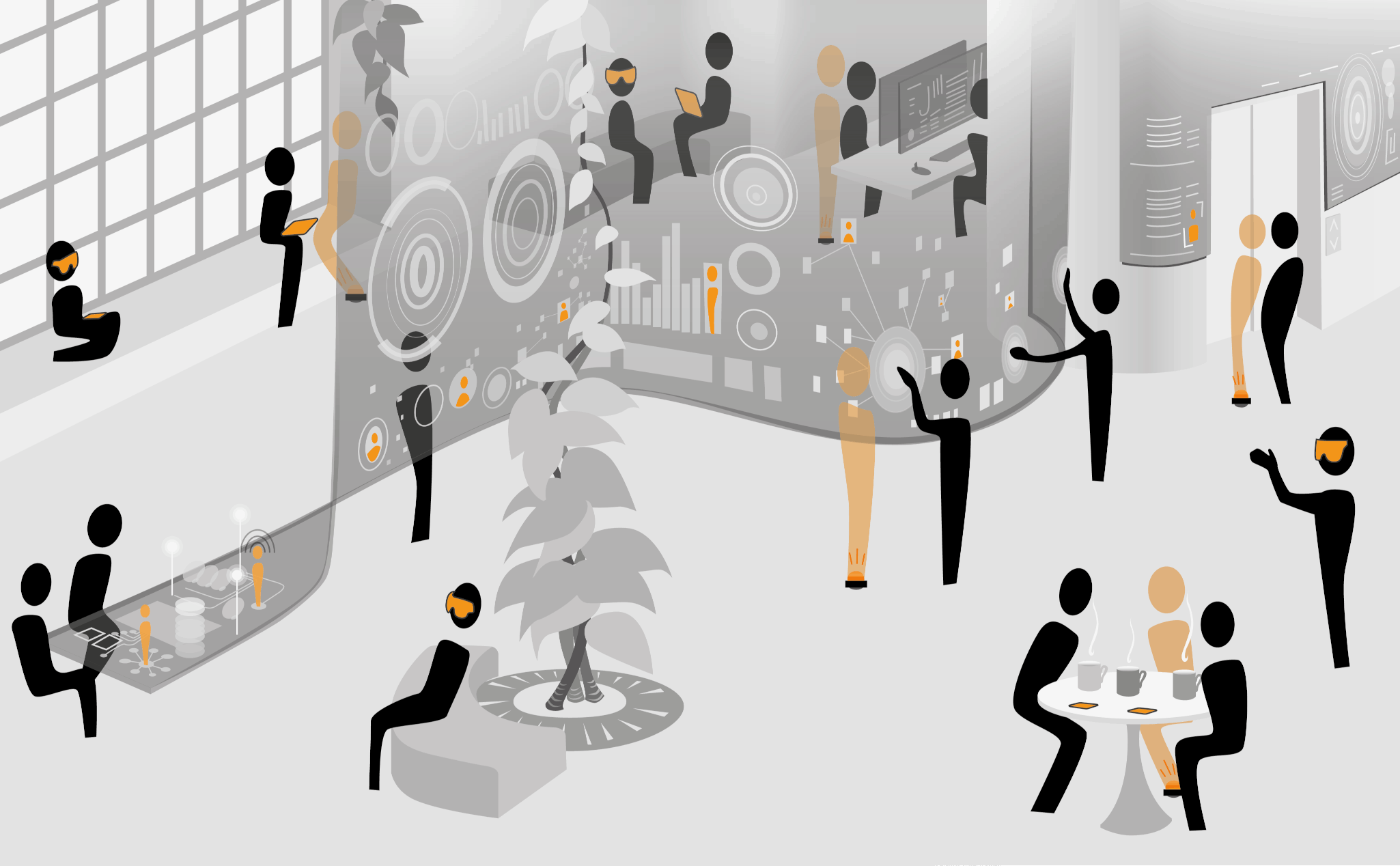
The “conference scenario” we choose for the CommunityMirror and for the smart glasses is closely related to an “office scenario” (Koch et al., 2024) – People sitting in talks is like people working individually, people walking around or talking to others (from the same community = all office workers or all conference participants) are alike (see Figure 8).
In this paper we did not discuss the empirical findings from earlier deployments that led to the design and the data selection. We also did not discuss privacy issues (regarding the data and the evaluation solution). This can be found in Koch (2025). However, we collected new insights and ideas about what data might be useful.
Acknowledgments
The CommunityMirror project has been running since 2004. In this time a lot of people have contributed to it. See Koch (2025) for more information on the project and the contributors.